 Manufacturing and Distribution
 Firearms
 Automotive and OEMs
 Healthcare & Life Sciences
 Sports & Outdoor Hunting Gear
 Regulated Industries eCommerce
 Adobe Commerce
 BigCommerce
 Magento
 myMagento
 WooCommerce
 Shopify Plus
 Shopware
 Magento 1 to Magento 2 Migration
 Magento Upgrade Service
 Magento Design
 Magento B2B
 Magento Hosting
 Magento Consulting
 Magento eCommerce Developers
 Magento SEO
 Magento Integration
 Magento Speed & Performance Optimization
 eCommerce Development
 Headless Commerce
 eCommerce GrowthX
 B2B CRO Services
 Enterprise SEO Services
 Email Marketing
 Website Localization Services
 AEO, GEO and AI Search
 AI Tools for Business
 Data Analytics Services
 GrowthX Strategy & Consultancy
 eCommerce Integration
 CRM Integrations
 Accounting Software Integrations
 ERP Integrations
 PIM Integrations
 Payment Gateways Integrations
 Tax Platform Integrations
 eCommerce Site Migrations
 Project Rescue
 Hire Developers
 Free Audit Report
 Extensions & Applications
 Custom Applications for eCommerce
 Magento Extensions
 Security & Fraud Prevention
 User Interface & Experience
 Website Design Services
 Support & Maintenance
 About Us
 Blog
Blog Webinars
 News & Updates
 Downloads
 FAQs
FAQs The Wagento Difference
 Hyvä
Hyvä iPaaS
iPaaS Klaviyo
 Sales Layer
 Sift
Sift Dot Digital
 Nousmedis
 Call
Call Message
Powering Growth for Manufacturers, Distributors & Beyond
In today’s fast-paced B2B commerce environment, fragmented systems are more than just inconvenient—they’re a liability. For manufacturers, distributors, and wholesalers, the success of a digital channel depends on seamless communication between frontend storefronts and backend operations.
If your ERP does not connect to your eCommerce platform, or your CRM cannot share customer data, you may have delays. This can lead to errors and frustrated teams.
B2B eCommerce integrations solve these issues by connecting your business systems into one intelligent workflow. No matter if you sell auto parts, industrial machines, or healthcare products, integrations help create one source of truth. They also enable real-time operations throughout your organization.
This guide explains the key systems you should use, like ERP, CRM, and PIM. It covers the benefits of integration for manufacturers and distributors. It also discusses common challenges and how to plan your strategy step by step.
You can expect real-world examples and future trends. There will also be a framework designed for industrial B2B sectors. You’ll receive insights applicable to any B2B organization.
What Are B2B eCommerce Integrations?
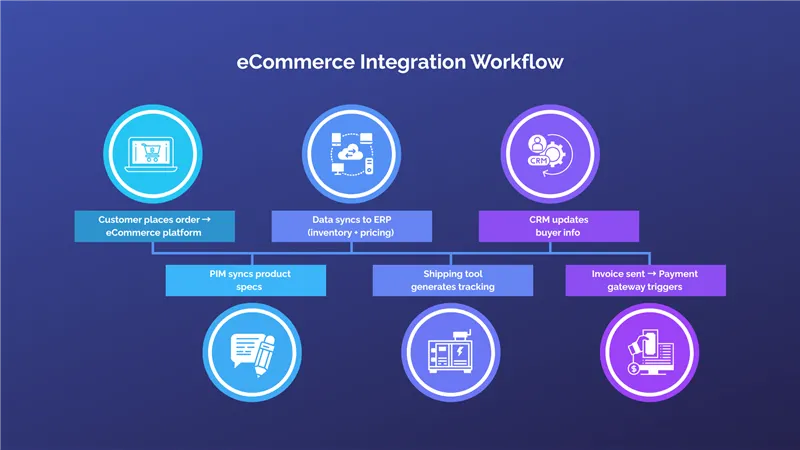
B2B eCommerce integration connects your online store with important business systems. These systems include ERP, CRM, PIM, WMS, and accounting software.
Instead of having your teams manually update orders, send invoices, or import product data, you can use integration. This allows for automatic data exchange. This happens in real-time between different systems.
The result? – There is one system that connects everything.
– Data flows easily from the customer’s screen.
– It goes to the warehouse, sales team, and finance department.
Why Seamless Integration Is Critical for B2B Growth
In B2B commerce, things move fast—but they’re also incredibly complex. Customers expect instant responses, accurate stock levels, custom quotes, and flawless fulfillment. If your systems don’t talk to each other, you risk costly errors and bottlenecks.
❗ What Goes Wrong Without Integration:
- Inventory Mismatches: Customers place orders for products that are out of stock.
- Pricing Errors: Outdated or incorrect pricing leads to re-negotiations or canceled orders.
- Manual Data Entry: Your staff wastes hours entering the same data in multiple places, leading to mistakes.
- Slower Fulfillment: Orders take longer to process, frustrating customers and risking churn.
- Compliance Issues: Incorrect tax rates or missing documents for regulated products.
In the B2B world, one pricing mistake or shipping delay can result in lost contracts, chargebacks, or reputational damage. Seamless integration helps you avoid these issues by making your processes predictable, scalable, and error-free.
How B2B Integrations Differ from B2C
While B2B and B2C share the common goal of selling online, their integration needs are vastly different. Let’s break down why.
| Feature | B2C eCommerce | B2B eCommerce |
| Pricing | Fixed pricing for all customers | Dynamic pricing by contract, volume, or customer |
| Orders | Single-unit orders | Bulk orders, reorders, and custom configurations |
| Users | Individuals | Buyer teams with multiple roles & permissions |
| Checkout | Simple one-time checkout | Quotes, PO-based checkout, multi-step approvals |
| Fulfillment | Single shipping address | Multiple shipping addresses, partial shipments |
| Sales Cycle | Short, self-service | Long, assisted with custom quotes |
In B2C, integrations focus on marketing automation and customer experience. In B2B, the focus shifts to operational efficiency, data synchronization, and enabling complex business workflows like:
- Custom product configuration (via CPQ tools)
- Tiered pricing by account
- Scheduled deliveries and backorders
- Credit terms and purchase orders
That’s why your B2B integration plan must address how your business sells and operates, not just how your website looks.
Types of Systems Commonly Integrated in B2B
To create a high-performing B2B digital ecosystem, you need to connect all your core systems. Here are the most commonly integrated tools—and what they do:
ERP (Enterprise Resource Planning)
- Tracks inventory, purchase orders, procurement, and accounting.
- Acts as the central source of truth for product availability and order processing.
CRM (Customer Relationship Management)
- Manages customer accounts, leads, conversations, and support tickets.
- Helps sales teams personalize communication and automate follow-ups.
PIM (Product Information Management)
- Stores and manages product content like descriptions, specs, and images.
- Ensures consistency across all channels and platforms.
OMS / WMS (Order / Warehouse Management Systems)
- Handles fulfillment workflows, from pick and pack to delivery tracking.
- Prevents overselling and helps manage multi-warehouse inventory.
CPQ (Configure-Price-Quote)
- Supports complex product configuration and automated quote generation.
- Ideal for B2B businesses with custom or high-value products.
Accounting & Tax Software
- Automates invoicing, tax calculation, and credit management.
- Ensures compliance with regional regulations.
Bringing all these systems together helps keep data clean. It also speeds up order processing. This creates a smooth sales-to-fulfillment cycle. People cause no delays.
Making Your Website the Easiest Place to Receive Orders
In a traditional B2B model, buyers emailed spreadsheets or called account managers to place orders. That doesn’t scale—and it frustrates your modern buyers who expect convenience.
With seamless integration, your website becomes the single most efficient place to receive, manage, and process B2B orders.
Why Integration Makes Your Website a Powerful Sales Engine:
- Real-time inventory: Buyers see exactly what’s in stock.
- Customer-specific pricing: Logged-in buyers see their negotiated rates.
- Fast reordering: Purchase history and saved carts speed up bulk orders.
- Live quotes: Generate and approve quotes directly from the site.
- Self-service: View invoices, track orders, and manage returns—without emailing support.
- Order routing: Orders go to the correct warehouse, printer, or sales rep automatically.
Common B2B eCommerce Integration Types
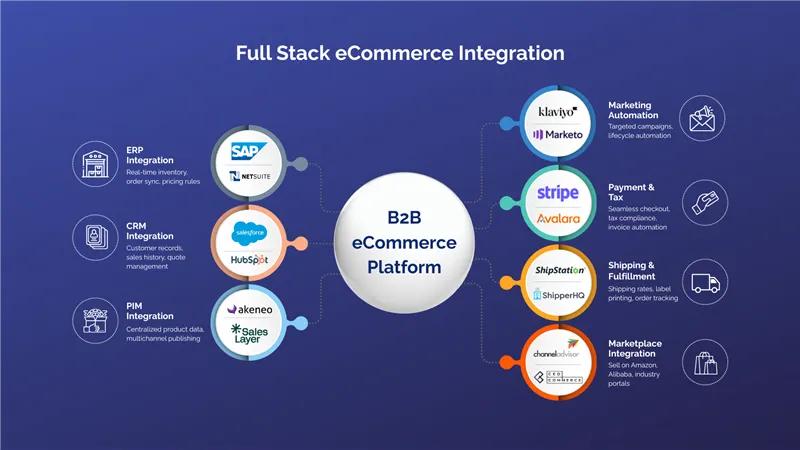
B2B businesses require far more than just a sleek storefront. The key to a successful B2B digital strategy is integrations. These are the connections that link your eCommerce platform to your other business systems.
These integrations help data move easily between all departments: operations, sales, marketing, finance, and fulfillment. This enables automation, cuts down on errors, and improves the customer experience.
Let’s explore the most common B2B eCommerce integration types, why they matter, and how they power your business growth.
1. ERP Integration
What It Is:
ERP (Enterprise Resource Planning) software manages your company’s core processes—inventory, order management, procurement, finance, and production.
Benefits:
- Real-time inventory levels and product availability
- Automated order syncing from storefront to ERP
- Accurate pricing, tax, and financial data
- Streamlined reporting and forecasting
Popular ERPs for B2B Integration:
- SAP – Ideal for large enterprises with complex operations
- NetSuite – Cloud-native ERP popular among mid-sized B2B firms
- Microsoft Dynamics 365 – Offers strong integration with other Microsoft tools
- Odoo – Modular, open-source ERP for flexible needs
2. CRM Integration
Why Syncing Customer Data Matters:
In B2B, relationships drive revenue. A CRM stores all customer interactions, communication history, and account notes. When integrated with your eCommerce system, your sales and service teams gain a full picture of each buyer.
Benefits:
- Real-time customer data access
- Automated workflows for nurturing leads
- Personalized account-based marketing
- Unified communication across sales and support teams
Popular CRMs for B2B:
- Salesforce – Best-in-class for enterprise B2B sales
- HubSpot – Popular among growth-stage B2B companies
- Zoho CRM – Cost-effective for SMBs
- Microsoft Dynamics CRM – Strong choice for Microsoft-stack users
3. PIM (Product Information Management) Integration
Why Product Data Consistency is Critical:
With thousands of SKUs, complex specs, and multiple channels, B2B product data can become messy fast. A PIM centralizes and structures your product information.
Benefits:
- Maintain consistent product content across all channels
- Improve time-to-market for new items
- Enable localization and translation for global reach
- Simplify compliance and data governance
Popular PIM Platforms:
- Sales Layer – Known for ease of use and integrations
- Akeneo – Strong open-source and enterprise offering
- Salsify – Commerce experience-focused PIM for large catalogs
- Plytix – Budget-friendly for growing B2B teams
4. Marketing Automation Integration
Why It Matters:
Marketing automation tools help convert leads, upsell customers, and keep your brand top of mind. When integrated with eCommerce and CRM systems, they enable smarter targeting and lifecycle marketing.
Benefits:
- Segment and target buyers based on past purchases
- Trigger automated campaigns for abandoned carts or reorder reminders
- Retarget inactive customers with special offers
- Build lead nurturing funnels for long-term sales cycles
Popular Tools:
- Klaviyo – Excellent for eCommerce automation
- Marketo – Enterprise-level automation for lead gen
- ActiveCampaign – Great for SMBs with CRM-light features
- Mailchimp – Entry-level tool with basic workflows
5. Payment Gateway & Tax Calculation Integration
Why It’s Crucial:
While B2B payments are more complex than in B2C, customers still expect seamless transactions. Integrated gateways and tax tools ensure fast, secure, and compliant checkouts.
Benefits:
- Support for PO, credit terms, and ACH payments
- Real-time tax calculation by region or exemption
- Automated invoice generation and payment reconciliation
- PCI-compliant, secure transactions
Popular Platforms:
- Avalara – Real-time tax compliance for U.S. and global markets
- Stripe – Flexible gateway with subscription billing
- PayPal for Business – Familiar and fast
- Authorize.Net – Trusted for B2B ACH payments
6. Shipping & Logistics Integration
Real-Time Fulfillment, Quotes, and Tracking:
Shipping delays and errors can cost you customers. When integrated with your OMS or eCommerce platform, logistics tools automate order routing and improve delivery visibility.
Benefits:
- Display accurate shipping estimates at checkout
- Route orders to nearest fulfillment center
- Print labels and packing slips automatically
- Send real-time tracking to customers
Popular Tools:
- ShipStation – Ideal for multichannel shipping automation
- FedEx API / UPS API – Direct carrier integrations
- ShipperHQ – Advanced rate and rules engine for B2B
- EasyPost – API-first solution for custom shipping flows
7. Marketplace Integration
Expand Your Reach While Keeping Data in Sync
Many B2B companies now sell on marketplaces like Amazon Business, Alibaba, or industry-specific portals. Marketplace integration ensures your inventory, pricing, and orders stay synchronized with your primary systems.
Benefits:
- Sell on more channels without losing control
- Sync orders from Amazon Business to your ERP
- Push real-time inventory to external platforms
- Avoid overselling or pricing mismatches
Popular Marketplace Integrators:
- ChannelAdvisor – Multi-channel selling powerhouse
- CedCommerce – Connects platforms like Magento or WooCommerce with Amazon, eBay, and more
- Linnworks – Unified commerce automation
- Mirakl – For building or selling on B2B marketplaces
Key Benefits of B2B eCommerce Integrations
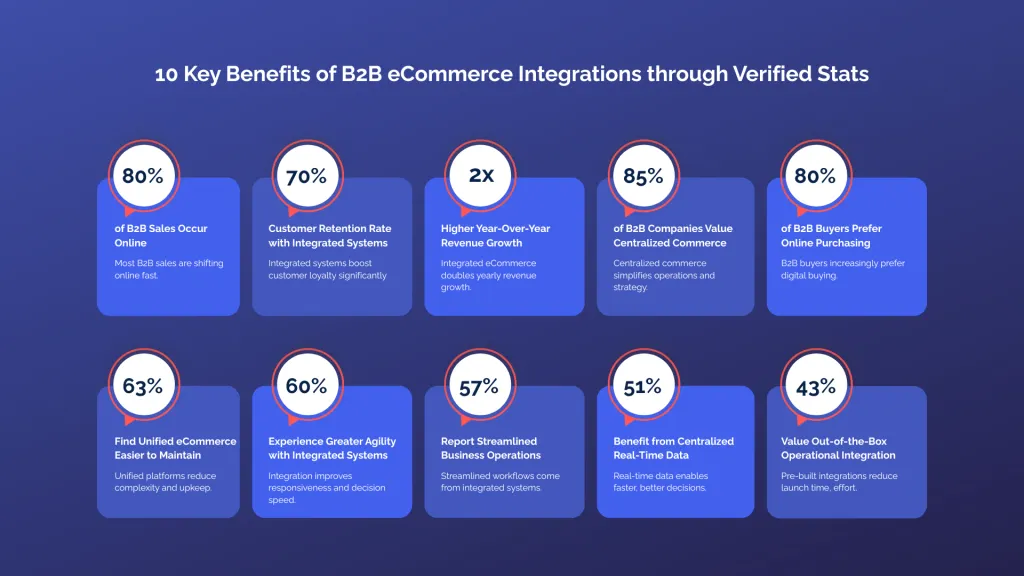
In B2B commerce, purchase orders, negotiated pricing, custom quotes, and multi-step approvals are common. System integration is the key that holds everything together. It’s what enables businesses to operate efficiently at scale, minimize human error, and provide consistent, reliable customer experiences.
Let’s explore the six most impactful benefits of B2B eCommerce integrations, with real-world application examples.
1. Improved Operational Efficiency
When your ERP, CRM, WMS, and eCommerce platform work together, your business processes become faster, cleaner, and more scalable.
Instead of juggling multiple platforms, data flows automatically:
- Orders placed online route directly into your ERP or OMS.
- Inventory levels adjust in real time without manual input.
- Financial data syncs automatically with your accounting tools.
This reduces friction between departments and eliminates redundancy.
No double entry of data
Reduced reliance on spreadsheets or offline tracking
Smoother collaboration between sales, operations, and finance
2. Real-Time Data Synchronization
Data accuracy is everything in B2B commerce. Your systems must always share the same information. This includes inventory, pricing, customer details, and product specs.
With real-time data sync:
- Buyers see up-to-date inventory and lead times.
- Your sales team views the latest customer activity in CRM.
- Finance gets immediate access to new invoices and transactions.
This level of visibility reduces costly mistakes like stockouts, pricing disputes, or order duplications.
Key Advantages:
- Up-to-the-minute accuracy
- Reduced errors in pricing or order details
- Confidence in reporting and forecasting
3. Better Customer Experience
Today’s B2B buyer expects B2C-level experiences: fast, easy, personalized, and digital.
Integrations make this possible by allowing your storefront to offer features like:
- Personalized product catalogs and pricing
- Self-service account dashboards
- Accurate order status and delivery tracking
- Instant invoice access and credit details
You’re not just streamlining operations—you’re giving your buyers more control and less friction.
Customer Experience Enhancements with Integration:
| Feature | Powered By |
| Reorder history | ERP/CRM Integration |
| Account-specific pricing | ERP Integration |
| Live inventory | ERP/WMS Sync |
| Automated shipping updates | WMS Integration |
| Online quote approval | CPQ Integration |
4. Streamlined Order Management and Fulfillment
From click to delivery, integrations ensure your order lifecycle runs like a well-oiled machine.
Without integration, each new order might require:
- Manual entry into ERP
- Manual inventory check
- Manual fulfillment request
That’s slow, error-prone, and hard to scale.
With integration:
- Orders from the storefront flow directly into your OMS or ERP.
- Inventory gets deducted automatically.
- Packing slips and shipping labels print instantly.
- Customers are notified with tracking information.
Faster shipping
Fewer fulfillment mistakes
Lower cost per order
5. Enhanced Decision-Making with Unified Data
When your systems are disconnected, reporting becomes a nightmare.
- Sales data lives in your CRM.
- Product data is stuck in your PIM.
- Financials are only in your ERP.
- Marketing performance is somewhere in GA or Klaviyo.
This fragmentation makes it hard to see the full picture.
With integration, you can combine this data into dashboards or BI tools, such as Power BI or Tableau. This lets you answer questions like:
- What’s our most profitable customer segment?
- Which product lines are declining in margin?
- Where are orders getting delayed in fulfillment?
Faster reporting
Data-backed strategy
Improved forecasting
6. Decreasing Manual Workload on Your Customer Service Team
Without integration, your support team spends hours every week answering questions like:
- “What’s the status of my order?”
- “Can I get a copy of my invoice?”
- “Did my payment go through?”
- “Can I get that quote again?”
These are not high-value activities—yet they’re unavoidable without proper system sync.
With integrations in place, customers can:
- Log in and view order statuses
- Download invoices directly
- Track shipments from the portal
- Get automated quote updates
This allows your support team to focus on complex questions and building important relationships. They won’t have to look up basic information.
Summary of Benefits
| Benefit | What It Solves | Business Impact |
| Operational Efficiency | Manual tasks and delays | Time savings and scale |
| Real-Time Sync | Errors and miscommunication | Better accuracy and trust |
| Better CX | Friction in the buying journey | Higher customer retention |
| Streamlined Fulfillment | Shipping delays and manual routing | Faster delivery, fewer errors |
| Unified Data | Siloed insights | Data-driven decisions |
| Lower Support Load | Repetitive queries | Happier teams and customers |
Integration Challenges in B2B eCommerce (And How to Solve Them)
While B2B eCommerce integrations offer massive benefits, they’re not without hurdles. For many businesses, especially those with complex operations or legacy systems, integration can feel overwhelming. But these challenges are solvable—with the right strategy and tools.
Here are the top five challenges most B2B businesses face when implementing integrations—and how you can overcome them.
1. Data Silos
The Problem:
Data silos occur when critical information is locked inside one department or system and isn’t shared across others. For example, your ERP may hold accurate inventory, but your sales team is working from outdated spreadsheets. Or your CRM has a record of the customer, but your fulfillment team doesn’t see recent complaints or service tickets.
Impact:
- Inconsistent data across platforms
- Misalignment between departments
- Delays in order processing and support
Solution:
Break down silos by connecting all key systems—ERP, CRM, PIM, OMS—so they speak to each other in real time. Use middleware or iPaaS tools like Celigo, Workato, or MuleSoft to enable smooth data sharing.
Make sure to set data ownership policies. These policies will define which system is the “source of truth” for each type of data. For example, use ERP for pricing and PIM for product content.
Pro Tip:
Conduct a data audit before integration begins. Clean, validate, and map the data fields across systems.
2. Complex Legacy Systems
The Problem:
Many manufacturers and distributors use ERP systems or internal software that were built decades ago. These systems may lack modern APIs, be poorly documented, or require specific knowledge to operate.
Impact:
- Integrations become time-consuming and fragile
- Risk of breaking core business processes during updates
- High IT dependency for even small changes
Solution:
If replacing the legacy system isn’t feasible, use integration bridges or middleware to modernize data access. Tools like Jitterbit or Dell Boomi can connect legacy systems with cloud-based platforms via adapters or custom connectors.
Also, consider wrapping your legacy system in an API layer, which allows you to interact with it without direct changes.
Pro Tip:
Start with one critical integration, such as syncing inventory from ERP to eCommerce, before expanding to others.
3. Scalability Issues
The Problem:
Many businesses build integrations in a one-off, hardcoded way. It might work for some time. But as you grow, add channels, or expand globally, these setups can break or become hard to manage.
Impact:
- Increased downtime and maintenance
- Limited ability to onboard new tools or sales channels
- Fragile workflows that can’t adapt to growth
Solution:
Plan for scale from day one. Use iPaaS (Integration Platform as a Service) tools that support orchestration across multiple systems and can grow with you. Look for platforms that offer:
- Reusable connectors
- Low-code visual workflows
- Versioning and rollback capabilities
- Performance monitoring and alerts
If you are growing quickly, think about composable commerce. This is a tech strategy where each system, like PIM, CMS, and ERP, is modular and API-first. This allows for flexible integration as you grow.
4. Security Concerns
The Problem:
Integrating multiple systems means transferring sensitive business and customer data across platforms. Improper configuration or outdated protocols can expose you to security risks—including data breaches, unauthorized access, and compliance failures.
Impact:
- Compromised customer trust
- Legal and regulatory penalties
- Loss of proprietary business data
Solution:
Prioritize security from the beginning. Choose integration tools and platforms that follow modern security standards like OAuth 2.0, TLS encryption, and token-based authentication. Conduct regular audits and penetration testing.
Additionally, set up role-based access controls (RBAC) and detailed logging so you know who accessed what, when, and why.
Compliance Tip:
If you work with data rules like GDPR or CCPA, make sure your integrations comply with consent. Also, follow data retention and deletion requests.
5. Lack of Internal Expertise
The Problem:
Many B2B companies don’t have in-house developers or integration architects, especially those that have recently gone digital. This lack of technical knowledge slows down implementation and increases reliance on external partners.
Impact:
- Delays in go-live timelines
- Expensive external consulting costs
- Poor internal adoption or maintenance post-launch
Solution:
Look for low-code or no-code integration platforms designed for business users, not just developers. These platforms allow your internal team to manage and monitor integrations through visual interfaces.
For more complex setups, work with an agency or system integrator. Choose one that knows B2B eCommerce well, especially your ERP or CRM system.
Training Tip:
Invest in onboarding your team early. Even if a third party builds your integrations, your internal staff should be trained on monitoring, updating, and troubleshooting.
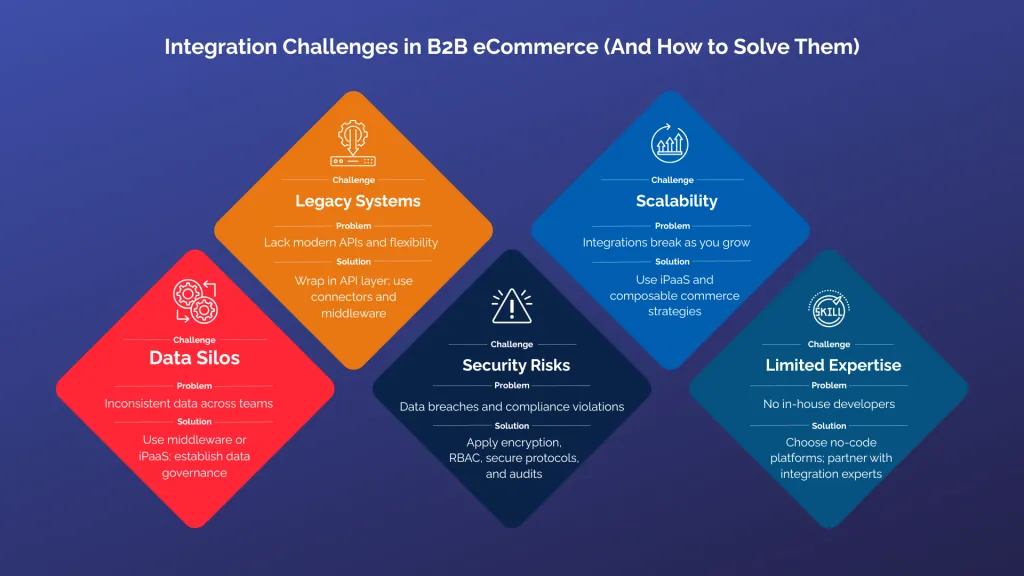
Summary Table: Challenges and Solutions
| Challenge | Problem | Solution |
| Data Silos | Inconsistent data across teams | Use middleware or iPaaS; establish data governance |
| Legacy Systems | Lack modern APIs and flexibility | Wrap in API layer; use connectors and middleware |
| Scalability | Integrations break as you grow | Use iPaaS and composable commerce strategies |
| Security Risks | Data breaches and compliance violations | Apply encryption, RBAC, secure protocols, and audits |
| Limited Expertise | No in-house developers | Choose no-code platforms; partner with integration experts |
Choosing the Right Integration Strategy
Before you dive into implementation, you need to choose the right integration approach. There’s no one-size-fits-all. Your decision will depend on your internal resources, systems, budget, and long-term goals.
Ask yourself:
Can your customers’ “My Account” page do everything your support team currently does?
If not, you have an integration gap. And fixing that gap starts with selecting the best integration strategy.
Here’s a breakdown of the key decisions to make—and what they mean for your business.
In-House Development vs. Third-Party Middleware
In-House Development
This means building integrations yourself—writing custom APIs, managing logic, and maintaining everything internally.
Best for:
- Companies with a strong internal dev team
- Complex, highly customized workflows
- Systems with no off-the-shelf connectors
Pros:
- Total control over integration logic
- Custom-fit for your business rules
- No reliance on third-party vendors
Cons:
- High time and resource investment
- Ongoing maintenance burden
- Risk of key-person dependency
Third-Party Middleware
Middleware acts as a translator between your systems, using connectors or templates to move data without full custom code. Think of platforms like Celigo, Jitterbit, or Boomi.
Best for:
- Mid-sized companies that need fast results
- Teams without in-house devs
- Businesses using popular systems with available connectors
Pros:
- Faster setup
- Scalable with visual workflows
- Often includes support, updates, and monitoring tools
Cons:
- Subscription costs
- May have limitations in deep customization
- Slight performance overhead compared to custom APIs
API-Based vs. Plugin-Based Integrations
API-Based Integrations
APIs (Application Programming Interfaces) allow direct system-to-system communication in real time.
Best for:
- Custom workflows
- Real-time syncing
- Businesses scaling across multiple platforms
Pros:
- Flexible and highly configurable
- Better performance for real-time applications
- Enables composable architecture
Cons:
- Requires technical expertise
- Testing and versioning can be complex
- Vulnerable to breaking during system updates
Plugin-Based Integrations
Plugins or extensions are ready-made tools for certain platforms. For example, there is a Magento extension for QuickBooks and a Shopify plugin for Salesforce.
Best for:
- Standard workflows
- Smaller B2B businesses or MVPs
- Faster time to market
Pros:
- Easy to install
- Lower upfront cost
- Vendor-supported and updated
Cons:
- Limited customization
- May conflict with other plugins
- Usually not scalable for complex use cases
Cloud-Based vs. On-Premise Solutions
Cloud-Based Integration
Cloud solutions operate on hosted platforms that connect systems via the web.
Best for:
- Businesses using SaaS platforms (e.g., Shopify, HubSpot)
- Teams that want quick deployment and remote access
- Companies scaling globally
Pros:
- Accessible from anywhere
- Auto-updated, maintained by vendor
- Scalable and flexible for new tools
Cons:
- Monthly/annual subscription fees
- Reliance on external uptime
- Limited offline capabilities
On-Premise Integration
Hosted and managed on your own servers, this approach is used for high-security environments or legacy systems.
Best for:
- Businesses with strict data control or regulatory needs
- Legacy ERP systems without modern APIs
- Internal server-based IT architecture
Pros:
- Complete control over data and performance
- Ideal for offline or high-security environments
- No vendor lock-in
Cons:
- High infrastructure and maintenance costs
- Slower to deploy
- Requires in-house IT expertise
Custom vs. Prebuilt Connectors
Custom Connectors
Developed specifically for your systems and use case.
Best for:
- Unique product workflows
- Multi-layered approval chains
- Custom pricing and quoting logic
Pros:
- Total flexibility
- Can reflect complex business rules
- Tailored UI/UX for internal teams
Cons:
- Expensive to build and maintain
- Harder to upgrade
- May require ongoing support contracts
Prebuilt Connectors
Available out-of-the-box for popular platform combinations—e.g., NetSuite <-> Shopify, or Magento <-> Salesforce.
Best for:
- Standard eCommerce workflows
- Fast deployments
- Startups or mid-sized companies with typical B2B needs
Pros:
- Ready to use
- Lower cost
- Frequently updated and tested
Cons:
- Less customizable
- May not cover every use case
- Dependent on vendor roadmap
Key Takeaway
Choosing the right integration strategy starts by understanding:
- Your tech stack
- Your business complexity
- Your team’s technical capabilities
- Your budget and timeline
Ask yourself:
- Do I need flexibility or speed?
- Can my team maintain this setup, or do I need ongoing vendor support?
- What will my tech stack look like in 2 years?
Answering these questions will help you strike the right balance between control, scalability, and cost.
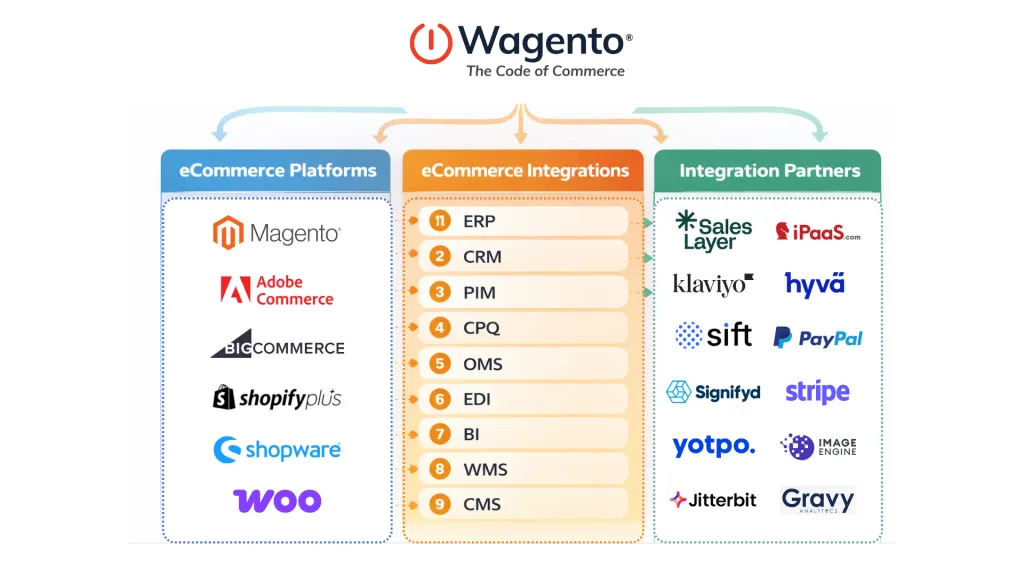
Best Practices for B2B eCommerce Integrations
You’ve selected the right integration strategy. Now what?
Execution matters just as much as planning. Even the best integration tools can fail if you don’t follow best practices. This includes setup, data hygiene, scalability, and governance.
Here are the best practices every B2B business should follow. These will help make their eCommerce integrations smooth, secure, and scalable from day one and for years to come.
1. Start with a Yearly Integration Plan
Many companies treat integrations as one-time projects. But in reality, your systems, processes, and customers evolve—and your integrations should too.
A yearly integration roadmap helps you stay proactive rather than reactive.
- Plan system upgrades and version changes in advance
- Allocate budget and technical resources to improvements
- Add new integrations (e.g., CPQ or BI tools) as you grow
- Review what’s working—and what’s creating bottlenecks
Pro Tip:
Make integration health a quarterly topic in IT and operations meetings. Set KPIs around sync speed, error logs, and platform downtime.
2. Conduct a Full System Audit
Before integrating anything, you need to understand what you already have.
Perform a complete audit of your:
- Current software and platforms
- Manual workflows (what’s still done by hand?)
- Existing integrations (native, API, plugin)
- Known system limitations or data inconsistencies
- User complaints and team feedback
This helps identify duplication, outdated tools, and where integration will provide the most ROI.
Questions to ask:
- Are we duplicating data entry anywhere?
- Which systems don’t talk to each other?
- Are we relying on spreadsheets or email for critical steps?
3. Ensure Strong Data Mapping and Data Quality
Bad data ruins good integrations.
Before connecting systems, you must define which fields need to sync, how they should be formatted, and who owns each data point.
Key Mapping Tasks:
- Match product attributes (SKU, name, category, etc.)
- Align customer data fields (name, email, company, payment terms)
- Map order statuses and fulfillment steps
- Standardize data types (date formats, currency, decimals, etc.)
💡 Create a shared data dictionary—a document that clearly defines every field’s source, format, and purpose across systems.
Also, clean your data before integration. Remove duplicates, correct typos, and standardize naming conventions.
4. Use Scalable and Flexible Solutions
Your integration setup should grow with you.
Don’t hard-code workflows that will break when you add a new warehouse, region, or marketplace. Instead, use tools that are:
- Modular – Easily add or remove systems
- Configurable – Change logic without full redevelopment
- Cloud-based – To support remote work and global teams
- Event-driven – Real-time updates instead of timed batch jobs
Recommended Tools:
- Celigo for ERP/eCommerce integration
- Workato for CRM and marketing automation syncs
- MuleSoft for enterprise-level orchestration
- Zapier or Tray.io for no-code business logic
5. Prioritize Security and Compliance
When your systems are integrated, they share sensitive business data—customer info, payment details, pricing structures, and order history. Any weak link can compromise the whole chain.
Ensure your integrations meet the latest security and regulatory standards:
| Regulation | What It Covers |
| GDPR (EU) | Personal data, consent, right to be forgotten |
| CCPA (California) | Consumer rights, data access and deletion |
| PCI DSS | Payment data security and encryption |
| SOC 2 | Operational and data security compliance for service providers |
Best Practices:
- Use TLS encryption for all data transfers
- Limit access with role-based permissions
- Enable two-factor authentication for admin access
- Maintain detailed logs of all syncs and changes
- Review vendor security certifications regularly (SOC 2, ISO 27001)
Integration Success = Consistent Execution
Integration isn’t just a switch you flip—it’s an evolving part of your B2B infrastructure. Following these best practices will save you from fire drills, lost revenue, and customer frustration.
| Best Practice | Why It Matters |
| Yearly Planning | Keeps integrations aligned with growth |
| System Audits | Identifies inefficiencies and duplication |
| Data Mapping | Prevents sync errors and confusion |
| Scalable Tools | Future-proofs your architecture |
| Security Focus | Avoids breaches and builds trust |
Popular B2B eCommerce Platforms and Their Integration Capabilities
Choosing the right eCommerce platform is foundational to your integration strategy. Most platforms offer basic integrations right away. However, they are not all the same for B2B needs, backend flexibility, and integration scalability.
This section compares popular B2B eCommerce platforms. It looks at their integration features, flexibility, and support for manufacturers, distributors, and wholesalers. It also considers complex B2B workflows.
1. Magento (Adobe Commerce)
Best for: Mid-to-large B2B businesses with complex catalogs and customization needs
Integration Strengths:
- Open-source architecture with robust API capabilities (REST & GraphQL)
- Built-in B2B features like custom pricing, shared catalogs, quote workflows
- Native support for integrating with ERPs like SAP, NetSuite, Microsoft Dynamics
- Supports headless and composable commerce via Adobe I/O and API mesh
- Marketplace extensions for CRMs, PIMs, tax, shipping, CPQ, and more
Popular Integrators:
- Celigo (NetSuite)
- MuleSoft (SAP)
- Webkul (PIM & marketplace)
- Adobe Commerce + Microsoft Dynamics (native integrations)
2. BigCommerce B2B Edition
Best for: Fast-scaling B2B companies and distributors that want out-of-the-box features without complex setup
Integration Strengths:
- Native API-first platform designed for headless and composable architecture
- Real-time RESTful APIs for syncing orders, inventory, pricing, and customer data
- Native support for PunchOut2Go, PayPal B2B, and Salesforce
- Open data layer (GraphQL, webhooks) allows easy connections with ERPs and PIMs
- Strong marketplace for B2B apps: ShipStation, QuickBooks, Avalara, Salsify
Popular Integrators:
- BundleB2B (advanced buyer portals)
- Brightpearl (OMS/ERP)
- ShipperHQ (shipping automation)
3. Shopify Plus
Best for: B2B brands with DTC presence or hybrid models wanting fast implementation
Integration Strengths:
- Powerful APIs (Admin, Storefront, Order, GraphQL) for connecting ERPs, CRMs, and marketing tools
- Shopify Functions and Flow for automating business logic
- Growing ecosystem of ERP connectors (NetSuite, Microsoft Dynamics, Acumatica)
- B2B on Shopify: Custom pricing, buyer permissions, company profiles
Popular Integrators:
- Alloy Automation
- Loop Returns
- Klaviyo
- ShipBob
- Avalara
4. WooCommerce
Best for: Small to mid-sized B2B companies needing flexibility at a low cost
Integration Strengths:
- Open-source and fully customizable for developers
- REST API available for ERP, CRM, and shipping sync
- Large library of WordPress plugins for tax, payments, and quoting
- Integrates with QuickBooks, Salesforce, Mailchimp, and PIM systems
Popular Integrators:
- WP All Import (CSV data sync)
- Webkul WooCommerce B2B Suite
- Zapier for simple automation
- WooCommerce ZapTax (tax sync)
5. Salesforce B2B Commerce
Best for: Enterprises already using Salesforce CRM or CPQ looking for a unified commerce and customer experience platform
Integration Strengths:
- Native integration with Salesforce CRM, CPQ, Marketing Cloud, and Service Cloud
- Drag-and-drop personalization, buyer-specific catalogs, negotiated pricing
- Open APIs (REST, GraphQL) and MuleSoft for ERP/PIM/OMS connectivity
- Powerful role-based buying workflows and self-service capabilities
Popular Integrators:
- MuleSoft (native)
- Informatica
- Avalara
- SAP connectors
6. SAP Commerce Cloud (Hybris)
Best for: Global B2B enterprises requiring deep ERP connectivity and multi-market complexity
Integration Strengths:
- Tightest possible integration with SAP ERP, S/4HANA, and SAP CPQ
- Industry-specific modules (manufacturing, automotive, life sciences)
- Omnichannel, multilingual, multi-currency support out of the box
- B2B-specific capabilities: corporate accounts, multi-user buying, budget management
Popular Integrators:
- SAP Cloud Platform Integration Suite
- OpenText (PIM/ECM)
- Informatica
7. OroCommerce
Best for: Mid-sized to enterprise B2B businesses needing built-in B2B features and open-source flexibility
Integration Strengths:
- Built from the ground up for B2B commerce (not a B2C add-on)
- API-first architecture with REST APIs and Webhooks
- Native B2B features: corporate accounts, tiered pricing, quotes, RFQ workflows, buyer roles
- Easy ERP, CRM (especially OroCRM), and PIM integrations
- Symfony-based framework allows deep customization
Popular Integrators:
- MuleSoft
- Synolia
- Akeneo
- Webkul
Platform Comparison Table
| Platform | Ideal For | Integration Strength | ERP/PIM/CRM Support | B2B Readiness |
| Magento | Complex B2B workflows | Fully customizable APIs | Excellent | Advanced |
| BigCommerce | Fast-growing B2Bs | Composable & scalable | Great | Strong |
| Shopify Plus | Hybrid B2B/DTC | Fast and extensible | Good | Moderate |
| WooCommerce | Cost-sensitive SMBs | Open-source flexibility | Fair | Add-on dependent |
| Salesforce Commerce | Salesforce-centric orgs | Full ecosystem integration | Excellent | Advanced |
| SAP Commerce Cloud | Enterprise with SAP ERP | Deepest ERP sync | Excellent | Enterprise-grade |
| OroCommerce | Mid-market to enterprise B2B | API-first, open-source flexible | Great | Built-in strong |
| Salesforce B2B Commerce | Salesforce-powered enterprises | Native CPQ & CRM integration | Excellent | Enterprise-ready |
When evaluating your eCommerce platform for integration readiness, ask:
- Does it offer open APIs or GraphQL?
- Is there a marketplace of trusted integration apps?
- How well does it support multi-channel operations?
- Does it scale with my team’s technical capabilities?
Selecting a platform with strong integration infrastructure ensures your B2B operations stay agile, automated, and future-proof.
Real-World B2B Integration Case Studies
B2B eCommerce integrations deliver measurable business impact when done right. At Wagento, we’ve helped manufacturers, distributors, and wholesalers modernize their systems with smart integrations that drive automation, self-service, and sales.
Here are a few client examples that show how powerful B2B integrations can be in the real world.
1. Reeds Family Outdoor Outfitters
Industry: Sports Equipment & Outdoor Apparel
Platform: Magento 2
Integrations: Custom Magento Extension for Split Orders, OMS, and Shipping
The Challenge
Reeds needed a way to manage high-volume orders that shipped to multiple addresses, often with different shipping timelines. Their old system lacked split-order capability, delaying fulfillment and causing confusion with customers.
The Solution
Wagento built a custom asynchronous order processing extension integrated with Magento 2 and their OMS. Orders are now automatically split based on delivery requirements, fulfillment center availability, and product type.
The Result
- 99.9% uptime during peak season
- 40% faster order processing
- Reduced cart abandonment from confused B2B buyers
2. Palmetto State Armory
Industry: Firearms & Sporting Goods
Platform: Magento Commerce
Integrations: ERP, Compliance Systems, Order Tracking
The Challenge
Palmetto needed to manage complex regulatory data and ensure secure shipping workflows for firearms—while delivering a modern B2B buying experience.
The Solution
Wagento integrated their Magento store with a custom ERP system and compliance software to handle ATF-regulated orders. We also added self-service features like invoice download, reordering, and shipment tracking.
The Result
- Reduced manual compliance checks by 75%
- Improved buyer retention through easier repeat ordering
- Enhanced trust and transparency via live tracking updates
3. XRay Marketplace
Industry: Industrial Supplies
Platform: Magento + Hyvä Theme
Integrations: PIM, Custom ERP, Multi-Warehouse Sync
The Challenge
XRay Marketplace wanted a faster website that could sync thousands of SKUs across multiple warehouse systems and offer dynamic product specs to B2B customers.
The Solution
Wagento implemented a Sales Layer PIM integration to manage product content and integrated Magento with their ERP to sync inventory and enable dynamic reordering and real-time pricing.
The Result
- 80% improvement in load speed after switching to Hyvä
- 30% increase in product discoverability through PIM-enhanced attributes
- Reduced customer service workload thanks to invoice downloads and reorder automation
4. Medical Supply Retailer (Confidential)
Industry: Healthcare B2B Supplies
Platform: WooCommerce
Integrations: HubSpot CRM, Avalara Tax, Payment Gateways
The Challenge
The client needed to automate quote generation and tax compliance while handling high order volumes from clinics and hospitals.
The Solution
Wagento integrated Avalara for real-time tax calculation and connected WooCommerce with HubSpot to track sales rep performance, automate email workflows, and manage client accounts.
The Result
- 30% improvement in quote-to-close speed
- Accurate, audit-ready tax reporting across 20+ states
- Simplified client access to past invoices and reorder options
What These Case Studies Prove
| Benefit | Example |
| Self-Service Invoicing | Palmetto & Medical Supply: Buyers download past invoices directly from their portal |
| Live Tracking Info | Reeds: Custom OMS integration powers real-time shipment updates |
| Reordering | XRay Marketplace & Palmetto: Logged-in customers reorder in 1 click |
| Sales Automation | Medical Supplies: CRM + quote integration shortens the sales cycle |
Future Trends in B2B eCommerce Integrations
B2B integrations have come a long way—from basic connectors to complex, event-driven orchestration layers. But the future is moving even faster. As B2B commerce becomes more dynamic, global, and experience-led, integration strategies are evolving from “backend efficiency” to core growth enablers.
Below are the key trends that will shape how manufacturers, distributors, and B2B service providers integrate and scale their digital operations in the years ahead.
1. Smarter Integrations Powered by AI and Machine Learning
Future-ready integrations won’t just move data—they’ll analyze, optimize, and heal workflows autonomously.
AI and ML are starting to play a key role in:
- Auto-mapping fields between different platforms
- Predicting sync failures or mismatches before they happen
- Automatically flagging and correcting anomalies in product data, tax rules, or pricing
- Recommending workflow improvements based on behavior patterns
As AI capabilities are embedded into platforms like Workato, Celigo, and iPaaS.com, B2B companies will be able to set up smarter, more resilient workflows that adapt to business complexity in real time.
What this means for B2B:
Fewer data sync failures, less reliance on IT teams, and faster integration launches across departments.
2. Headless Commerce and Composable Architecture
Monolithic platforms are giving way to composable commerce stacks, where each business function—product search, pricing, order management, CMS, fulfillment—is handled by the best tool for the job.
This shift demands deeper, real-time integrations between all those services.
In a composable architecture, integrations:
- Must be API-first, asynchronous, and event-driven
- Need to support multiple frontend channels (web, mobile, PunchOut, EDI)
- Should allow for rapid experimentation without disrupting backend stability
Integration tools like iPaaS.com are becoming essential here. They serve as orchestration layers that allow businesses to connect, configure, and monitor multiple services (ERP, CPQ, WMS, tax, CRM) from one platform—without rewriting everything when a new service is added.
Future impact:
Businesses will gain the flexibility to launch new customer experiences, regional storefronts, or workflows in weeks—not months.
3. The Rise of No-Code and Low-Code Integration Platforms
Historically, integrations required a team of backend developers and months of effort. Not anymore.
Modern platforms are shifting towards:
- Drag-and-drop workflows for connecting systems
- Prebuilt templates for common use cases like ERP-to-eCommerce sync or CRM-to-marketing automation
- Visual logic builders for conditional rules (e.g., if stock < 10, alert warehouse)
Platforms like iPaaS.com, Tray.io, and Make (Integromat) now empower non-technical users—such as marketing, sales ops, or logistics managers—to build and update integrations without writing a single line of code.
This shift democratizes integration and shortens the innovation cycle significantly.
Future impact:
Smaller teams can move faster, and large teams can reduce dev bottlenecks while retaining control and visibility.
4. Event-Driven Integrations Will Replace Batch-Based Syncing
Traditional B2B systems often rely on batch syncing—data is transferred in scheduled intervals (e.g., every 4 hours). But with increasing demand for real-time accuracy, this model is fading.
Event-driven integrations push updates the moment they happen:
- A product is updated in PIM → immediately synced to storefront
- A customer places an order → instantly appears in ERP and triggers fulfillment
- A payment is completed → CRM and accounting update in real time
Modern integration platforms (especially iPaaS and microservice orchestrators) now enable publish/subscribe models for real-time updates with minimal delay.
Future impact:
Real-time customer experiences and instant backend reactions become the norm—not the exception.
5. Security, Privacy, and Compliance by Default
As more systems share sensitive data—pricing, customer contracts, invoices, tax records—integration platforms must meet higher standards for security and compliance.
Expect deeper alignment with:
- GDPR, CCPA, and evolving international privacy laws
- PCI DSS for payment and invoice systems
- SOC 2, ISO 27001, and industry-specific security audits
Integration platforms like iPaaS.com are building governance features, such as:
- Role-based permissions
- Data retention policies
- Detailed change logs
- Secure API token handling
Future impact:
Security won’t be an afterthought. Integration governance will be built-in from day one, especially for regulated industries like healthcare, finance, and government contractors.
6. Integration as a Competitive Advantage
Integrations are no longer just backend plumbing—they’re becoming frontline growth levers.
Companies that can connect systems faster:
- Launch products quicker
- Deliver better self-service options
- Offer accurate real-time pricing
- Improve sales rep productivity through data visibility
- Expand into new markets with less friction
B2B businesses are beginning to treat integration strategy like product strategy—actively investing in platforms, talent, and workflows that support faster and more flexible growth.
Conclusion:
B2B eCommerce integrations are evolving—from point-to-point scripts into intelligent, modular, and scalable platforms that power entire digital ecosystems.
To stay ahead:
- Leverage AI and ML to automate and optimize workflows
- Embrace headless and composable architectures that demand seamless system orchestration
- Equip business teams with no-code tools to reduce IT bottlenecks
- Shift from batch to real-time, event-driven syncing
- Choose platforms like iPaaS.com that offer flexibility, governance, and speed at scale
The future of B2B integration is clear: it’s faster, smarter, and more strategic than ever before.
Final Thoughts: Bringing It All Together
B2B eCommerce integrations are no longer optional—they’re the foundation of a scalable, efficient, and customer-focused business. In an environment where speed, accuracy, and personalization drive loyalty and revenue, disconnected systems only hold you back.
Throughout this guide, we explored:
- What B2B eCommerce integrations are and why they matter
- How integrations differ from B2C models
- The core systems to connect—ERP, CRM, PIM, OMS, CPQ, and accounting
- Key benefits like real-time syncing, operational efficiency, and improved CX
- Common integration types and challenges with proven solutions
- Best practices for secure, scalable implementation
- Platform comparisons for integration readiness
- Case studies showing measurable results
- Future trends like AI-powered workflows, no-code tools, and composable commerce
Whether you’re a manufacturer syncing thousands of SKUs or a distributor improving quote-to-order speed, the takeaway is simple: integration is how B2B businesses grow smarter, faster, and more profitably.
If you’re still managing orders manually, relying on siloed data, or struggling with delayed fulfillment—now is the time to rethink your approach.
What’s Next?
Explore more ways to turn your integration roadmap into a revenue-generating strategy:
- Read more Wagento case studies
- Talk to our B2B integration specialists
- Request a personalized integration strategy session
- Get a free integration audit
Let’s build your connected B2B future – intelligently, securely, and at scale.