 Manufacturing and Distribution
 Firearms
 Automotive and OEMs
 Healthcare & Life Sciences
 Sports & Outdoor Hunting Gear
 Regulated Industries eCommerce
 Adobe Commerce
 BigCommerce
 Magento
 myMagento
 WooCommerce
 Shopify Plus
 Shopware
 Magento 1 to Magento 2 Migration
 Magento Upgrade Service
 Magento Design
 Magento B2B
 Magento Hosting
 Magento Consulting
 Magento eCommerce Developers
 Magento SEO
 Magento Integration
 Magento Speed & Performance Optimization
 eCommerce Development
 Headless Commerce
 eCommerce GrowthX
 B2B CRO Services
 Enterprise SEO Services
 Email Marketing
 Website Localization Services
 AEO, GEO and AI Search
 AI Tools for Business
 Data Analytics Services
 GrowthX Strategy & Consultancy
 eCommerce Integration
 CRM Integrations
 Accounting Software Integrations
 ERP Integrations
 PIM Integrations
 Payment Gateways Integrations
 Tax Platform Integrations
 eCommerce Site Migrations
 Project Rescue
 Hire Developers
 Free Audit Report
 Extensions & Applications
 Custom Applications for eCommerce
 Magento Extensions
 Security & Fraud Prevention
 User Interface & Experience
 Website Design Services
 Support & Maintenance
 About Us
 Blog
Blog Webinars
 News & Updates
 Downloads
 FAQs
FAQs The Wagento Difference
 Hyvä
Hyvä iPaaS
iPaaS Klaviyo
 Sales Layer
 Sift
Sift Dot Digital
 Nousmedis
 Call
Call Message
A trade publication mentions you on a Tuesday morning. Or a competitor has an outage and their buyers come looking for an alternative. Or a supplier announces a price increase and every customer decides to reorder before it lands.
Traffic doubles. Nobody planned for it, and for about twenty minutes it feels like the best day your business has had all year.
What happens after those twenty minutes was decided months ago, by people who were not thinking about this day at all. It was decided by how the store was built, how much of it can be served without asking the database a question, and whether anyone has ever measured the point at which it stops coping.
Here is what actually happens, in the order it happens, and what you can do about it while there is still time.
Sites do not fail all at once
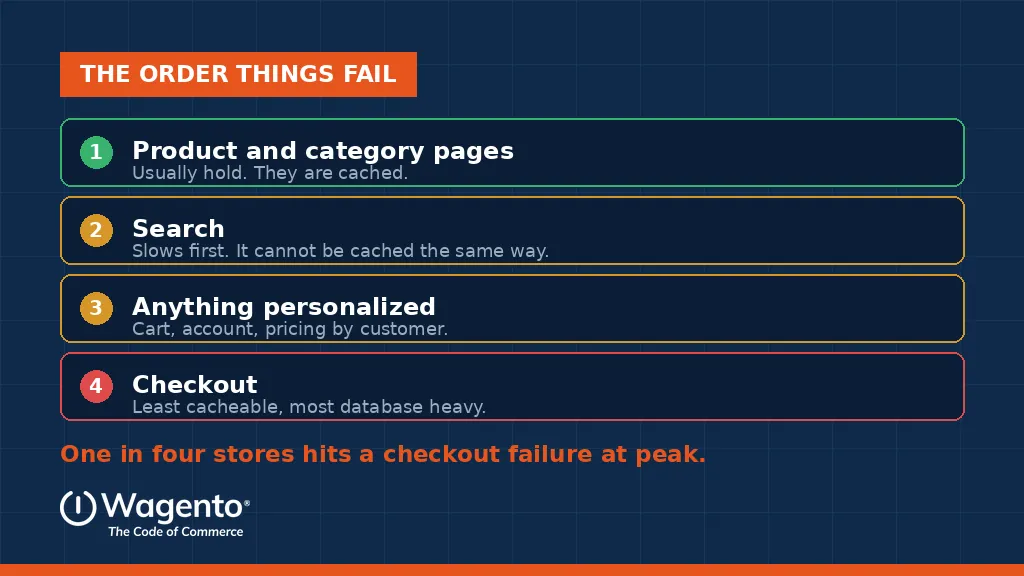
This is the most useful thing to understand about traffic spikes, and it is the part most people get wrong. A store under load does not simply slow down and then stop. It fails in a predictable sequence, and knowing the sequence tells you exactly where your money should go.
Product and category pages usually hold up longest. They are the same for every visitor, so they can be cached and served without much effort. If your homepage is still fast during a spike, that is not evidence the store is fine. It is evidence that caching works.
Search slows down first. Search results depend on what the visitor typed, so they cannot be cached the same way, and every query is real work. On a large catalog with faceted navigation, search is often the single heaviest thing your store does.
Then anything personalized starts to struggle. The cart. The account area. Customer specific pricing. All of it has to be calculated for each individual visitor, which is precisely what caching cannot help with.
And then checkout goes. Checkout is the least cacheable and most database intensive part of any store, and it is where a spike does the most damage. Industry readiness research puts checkout failures during peak periods at roughly one store in four. That is the cruelest possible place to break, because every visitor who reaches checkout has already decided to buy from you. You paid to acquire them, you convinced them, and then the store dropped them at the till.
This is not hypothetical, and the numbers are public
It is tempting to treat all of this as a risk that happens to other people. It is worth looking at what it has actually cost companies with far larger engineering budgets than yours.
On Thanksgiving Day 2019, Costco’s website went down for roughly sixteen and a half hours during its own promotion. Retail aggregator LovetheSales.com estimated the lost sales at close to 11 million dollars. Costco later told investors that November ecommerce sales were hit and that total and comparable sales were affected by around 1.5 percent. The company had to extend its one day Thanksgiving sale into Black Friday to compensate.
A year earlier, J.Crew’s site failed intermittently across about five hours on Black Friday. The same aggregator estimated roughly 323,000 shoppers affected and around 775,000 dollars in lost sales. Shoppers were shown a holding screen and could not sign in or complete orders. In the same period, estimates put a Walmart incident at roughly 3.6 million shoppers and around 9 million dollars.
Best Buy took a different approach during one Black Friday, deliberately taking its own site down after what the company described as a concentrated spike in mobile traffic, in order to restore performance. That is a reasonable decision made under pressure, and it is still hours of trading lost.
Two things to take from this. First, these are companies with serious infrastructure teams and real budgets. Scale does not exempt you, and neither does spending. Second, notice where the failures land in almost every case: sign in, cart and checkout. The same order described above.
And the cost is not only the orders you lose during the outage. Research quoted by Retail TouchPoints found that around 49 percent of Black Friday shoppers say they will abandon their cart if they hit an error at checkout, and roughly 17 percent say they will go straight to a competitor to find the same item. The second number is the expensive one, because it does not end when the site comes back.
This is an architecture problem, not a hosting problem
When a store falls over, the first instinct is usually to buy more servers. Sometimes that helps. Often it does not, because the question was never how much hardware you have.
The real questions are different. How much of a page can be delivered without touching the database at all? How many separate queries does a category page fire before it renders? Is your search doing work at request time that could have been calculated in advance? Do your background queues drain faster than they fill?
If a store asks the database too many questions, doubling the traffic simply doubles the questions. More servers means more machines asking the same overloaded database the same inefficient questions, slightly faster. The bottleneck moves, but it does not disappear.
This is why performance work that actually holds up under pressure looks like architecture work. Cache strategy, query efficiency, index design, queue behavior, and how the front end talks to everything behind it.
Autoscaling is not a plan
Modern hosting scales automatically, and that genuinely helps with one part of the problem. When traffic climbs, more web servers come online to answer requests. That is real and it is useful.
The trouble is that only one layer scales that easily. Your database does not scale the same way or at the same speed. Neither does your search cluster. Neither does the integration layer connecting your storefront to the systems that actually run your business.
So the front end absorbs the wave, passes it straight through, and the pressure lands on the parts that cannot expand. Most teams discover this distinction during the incident rather than before it, usually while watching a dashboard that shows plenty of available capacity and a site that is nonetheless failing.
The part almost nobody tests
Here is the failure that costs B2B businesses the most, and it is almost never included in a load test.
On a B2B store, the order does not end at the confirmation page. It still has to reach your ERP, with the right customer, the right contract price, and the right terms. That handoff usually runs through a queue, and under heavy load the queue backs up.
What makes this dangerous is that it fails quietly. There is no error page and no alert. The storefront reports a record day. Orders arrive in the ERP late, or twice, or with pricing that was correct an hour earlier and is not correct now. Nobody notices until operations starts reconciling, and by then the damage involves customers, invoices, and shipments.
If your load test stops at the confirmation page, you have tested half your system. The half you skipped is the half your business runs on.
What a real load test looks like
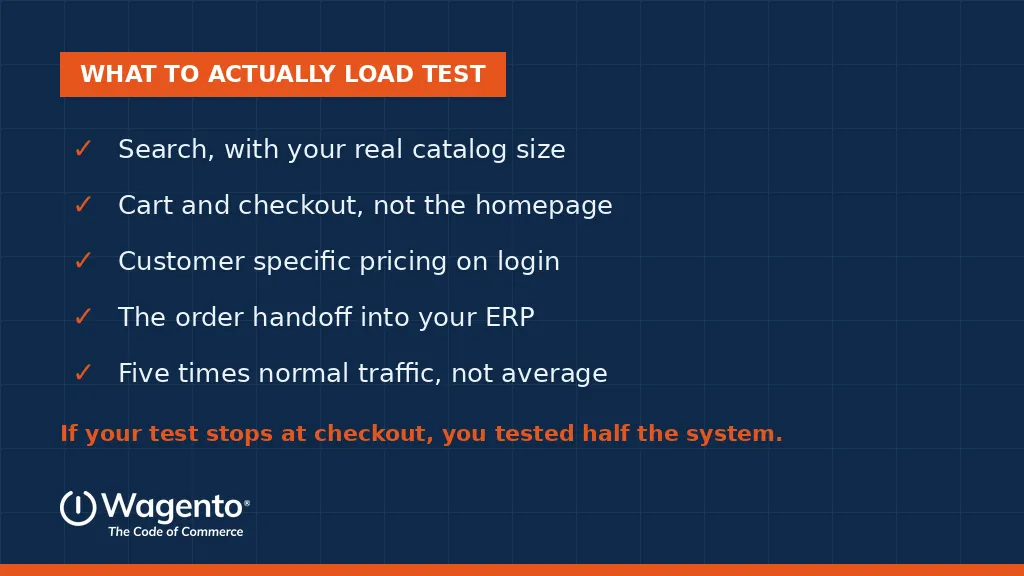
Most load testing is reassuring rather than useful, because it tests the easy parts at a comfortable volume. A test worth running looks like this:
✓ Test at roughly five times your normal traffic, not your average day. Averages hide spikes, and spikes are the entire point.
✓ Test search with your real catalog size and real filter combinations, not a sample.
✓ Test cart and checkout under concurrent load, not one session at a time.
✓ Test customer specific pricing after login, because that is where B2B stores do their heaviest work.
✓ Test the order handoff into your ERP and confirm the orders arrive correctly, not just that checkout completed.
Come out of it with a number. Not a feeling, not a color coded dashboard, but an actual figure for the concurrent load at which something gives way and which component gives way first. A breaking point you can name is a budget conversation. A breaking point nobody can name is an argument that repeats every year.
Why September is the month to do this
Peak trading is roughly ninety days out. That is enough time to find a problem, scope a fix, test it, and deploy it calmly.
In late November, the same discovery is an incident. It happens during a code freeze, with the highest traffic of the year on the site, with everyone watching, and with every hour of delay costing real orders. The fix is identical. The circumstances are not.
There is a second reason the timing matters this year. For merchants running Adobe Commerce on Cloud, Adobe has set enforcement deadlines for the software layer underneath the platform, and the first one falls on October 30. Environments that miss it can have traffic suspended. That work needs to be requested in advance, which means the practical deadline arrives in late September, not late October.
So the same ninety day window contains both a peak readiness deadline and a compliance deadline. That is a lot of pressure for an internal team carrying it alone, and it is worth saying plainly that you do not have to.
This is the part we handle
Wagento runs stores as well as builds them, and this is exactly the work we take off a merchant’s desk.
Our managed service is called myMagento. It covers security patches, version upgrades, infrastructure updates, 24/7 uptime monitoring with alerts, and priority support from certified Magento developers rather than a general help desk. Plans start at 500 dollars a month, the pricing is published rather than quoted case by case, and every plan includes a named success manager who owns each open issue from report to resolution. (See myMagento plans and pricing)
Two of those plan guarantees matter directly to everything above. The Checkout Guarantee treats a checkout failure as a priority one incident with a defined response window, because a checkout outage on a B2B store costs more per hour than any other failure. The Performance Guarantee covers load times and stability during traffic spikes, which is the exact scenario this article is about.
On upgrades, this is routine work for us rather than an occasional project. Version upgrades, the dependency changes Adobe is enforcing this October, and the regression testing afterward that proves your extensions, your search, and your ERP and PIM integrations all still behave. We do it constantly. It does not need to become a crisis for you. (Magento Upgrade Service)
If you are looking at October 30 and a Black Friday code freeze and wondering how both fit into one quarter, that is a normal reaction and it is a solvable problem. It is solvable faster the earlier you start, because scheduling gets tighter every week from here.
The honest advice is simple. Do not wait for the deadline to become urgent. Contact us now, while there is still room to schedule this calmly rather than squeeze it into the last week of October.
If you are not sure where you stand, the myMagento free plan includes priority access and dashboard monitoring at no cost, which is a low commitment way to get eyes on your store before peak.
Where to start
Send us your platform version and we will come back with a straight answer on two things: where your store is likely to break under load, and which deadlines actually apply to you between now and the end of the year. No charge, and no obligation to have us do the work.
Book a discovery call: Contact Us | +1 (612) 594-7699
FAQ
It does not fail evenly. Cached pages such as product and category listings usually hold up, while search slows down first because results cannot be cached the same way. Personalized areas like the cart and customer specific pricing struggle next, and checkout tends to fail last and hardest, because it is the least cacheable and most database intensive part of the store. Knowing that order tells you where to focus, because the parts that look fine during a spike are often the parts that were never at risk.