 Manufacturing and Distribution
 Firearms
 Automotive and OEMs
 Healthcare & Life Sciences
 Sports & Outdoor Hunting Gear
 Regulated Industries eCommerce
 Adobe Commerce
 BigCommerce
 Magento
 myMagento
 WooCommerce
 Shopify Plus
 Shopware
 Magento 1 to Magento 2 Migration
 Magento Upgrade Service
 Magento Design
 Magento B2B
 Magento Hosting
 Magento Consulting
 Magento eCommerce Developers
 Magento SEO
 Magento Integration
 Magento Speed & Performance Optimization
 eCommerce Development
 Headless Commerce
 eCommerce GrowthX
 B2B CRO Services
 Enterprise SEO Services
 Email Marketing
 Website Localization Services
 AEO, GEO and AI Search
 AI Tools for Business
 Data Analytics Services
 GrowthX Strategy & Consultancy
 eCommerce Integration
 CRM Integrations
 Accounting Software Integrations
 ERP Integrations
 PIM Integrations
 Payment Gateways Integrations
 Tax Platform Integrations
 eCommerce Site Migrations
 Project Rescue
 Hire Developers
 Free Audit Report
 Extensions & Applications
 Custom Applications for eCommerce
 Magento Extensions
 Security & Fraud Prevention
 User Interface & Experience
 Website Design Services
 Support & Maintenance
 About Us
 Blog
Blog Webinars
 News & Updates
 Downloads
 FAQs
FAQs The Wagento Difference
 Hyvä
Hyvä iPaaS
iPaaS Klaviyo
 Sales Layer
 Sift
Sift Dot Digital
 Nousmedis
 Call
Call Message
Magento 2.4.6 reached the end of its standard support on August 11, 2026. Orders keep coming in and the storefront looks the same, so it can feel like nothing changed. Something did. What happens next depends on which edition you run, and the answer for most stores is a planned upgrade rather than a rebuild.
This guide lays out the dates, explains what they mean for a B2B store, and gives you a simple way to plan your upgrade.
Where Magento 2.4.6 stands today
| Edition | What happens now | Key dates |
| Adobe Commerce (licensed) | Extended support with quality and security patches for the core application, at no additional cost, then a security only period with limited fixes. | Extended support to the end of August 2027. Security only fixes to May 31, 2028. |
| Adobe Commerce on Cloud | Same support as above, plus Adobe’s enforced version upgrade date. | 2.4.6 and 2.4.7 upgrade to 2.4.9 or later by June 1, 2028. |
| Magento Open Source | Adobe offers extended support to Adobe Commerce customers only. Treat August 11, 2026 as the end of regular patches. | Upgrade now. |
Sources for the dates: Adobe’s lifecycle policy and enforcement page. Adobe’s two pages differ by one day on the end of extended support (the lifecycle table says August 31, 2027; the enforcement page says August 30), so we say the end of August 2027.
One nuance for Open Source stores. When Adobe released the APSB26-146 emergency hotfix in September, its guide listed compatibility with Magento Open Source 2.4.4 to 2.4.7. That is welcome, but an emergency hotfix is not a support plan. Adobe itself notes that a hotfix does not address all the security issues an upgrade would resolve.
The second clock: PHP
Magento 2.4.6 runs on PHP 8.1 or 8.2. Adobe lists PHP 8.1 as reaching end of life on December 31, 2025 and PHP 8.2 on December 31, 2026, and marks both as a PCI compliance risk once past those dates. So even an Adobe Commerce store with extended support faces a PHP deadline in under 3 months. Moving to a current Commerce release is the cleanest way to move to a supported PHP version.
What staying on 2.4.6 means
Newly found vulnerabilities may not receive regular fixes. History shows how quickly unpatched stores get hit: after the SessionReaper fix in 2025, only 38% of stores had patched six weeks later, and mass attacks followed.
Older stacks also collect side effects. Extension vendors focus on newer releases, older PHP versions age out, and each month adds more compatibility work to the eventual upgrade.
Where to upgrade to
Adobe Commerce 2.4.8 has standard support to May 31, 2028, and 2.4.9, released May 12, 2026, has standard support to May 31, 2029. Version 2.4.9 supports PHP 8.4 and 8.5, adds OpenSearch 3 and Valkey 8 support, and removes PHP 8.2 support. For most 2.4.6 stores we recommend going straight to 2.4.9, so the next upgrade is years away rather than months.
An upgrade is a business benefit
Most teams think of an upgrade as a fix. We encourage you to treat it as an improvement that pays back:
- A better base for speed. A current PHP, search, and cache stack gives your team a stronger starting point for Core Web Vitals work, which Google uses to measure loading, interactivity, and visual stability. The upgrade alone does not guarantee faster pages; the tuning after it does.
- A supported foundation. Current PHP, database, and search versions keep receiving fixes and work with modern tools.
- A smoother admin and checkout. Your team and your buyers feel the difference every day.
- A safe base for AI. Chatbots, recommendations, and agents need a secure, supported store underneath them.
Why upgrading usually beats starting over
An upgrade keeps what already works: your catalog and customer data, your ERP and PIM integrations, your B2B pricing rules, your URLs and search rankings, and everything your team knows about running the store. A rebuild puts all of that back on the table at once. For a B2B store with years of integration work, that is why we recommend upgrading in nearly every case.
Check extensions and custom code first
Most upgrade surprises come from extensions and custom modules, so start there:
- List every extension and confirm each vendor’s current release supports your target version.
- Run Adobe’s Upgrade Compatibility Report to see which modules and files need updates.
- Review custom code that touches checkout, search, pricing, and your ERP integration.
- Check PHP, database, search engine, cache, and queue versions against your target.
Three ways to upgrade
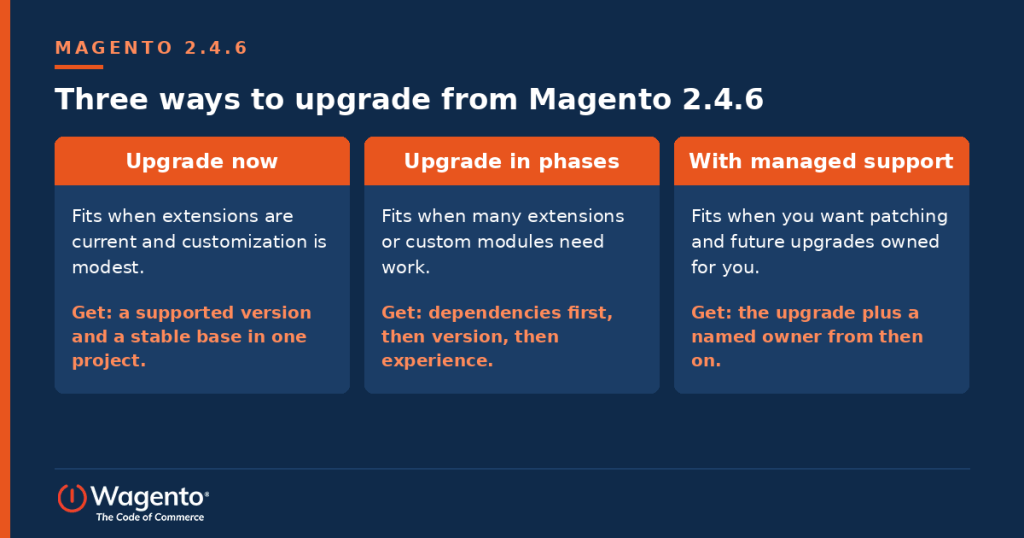
| Path | Fits when | What you get | What to watch |
| Upgrade now | Extensions are current and customization is modest. | A supported version, a current PHP stack, and a stable base in one project. | A short code freeze and full testing of checkout and integrations. |
| Upgrade in phases | You carry many extensions or custom modules. | Steady progress: dependencies first, then version, then experience. | A clear plan, so each phase has an owner and a date. |
| Upgrade with managed support | You want patching, monitoring, and future upgrades to have a named owner. | The upgrade plus ongoing care, so you never fall this far behind again. | Agree response times and the upgrade calendar up front. |
Weighing the cost of risk against the cost of upgrading
| Cost of waiting | Cost of upgrading | |
| Security | Exposure to flaws that may not get regular fixes | A planned project with testing |
| Compliance | PHP past end of life puts PCI compliance at risk | A supported PHP version |
| Budget | Emergency work is harder to budget and usually rushed | Planned work is easier to scope and spread out |
| Timing | Dates set by a deadline or an incident | Dates set by your business calendar |
| Growth | Older tools hold back new work | A faster base for new features, including AI |
Weighing other platforms as well? We work across several and will give you an honest comparison if you ask. For most Magento stores, though, the fastest and lowest risk route to a secure, supported store is the upgrade.
Your readiness checklist
- You know your exact version, your edition (Adobe Commerce or Magento Open Source), and your hosting setup.
- You have an extension inventory with vendor support status.
- You have a list of custom modules and what each one does.
- You know which ERP, PIM, and CRM connections must keep working.
- You have a staging environment that mirrors production.
- You have a rollback plan.
- You have a business owner for the project.
- You have a target date.
Get a free upgrade readiness check
We build it, connect it, run it, and grow it. Our free readiness check reviews your version, edition, extensions, custom code, and integrations, then recommends an upgrade path with a rough sequence. Prefer to hand off the upkeep afterward? myMagento covers patches, upgrades, and 24/7 monitoring. One time project? See our Magento upgrade service.
On Adobe Commerce on Cloud? Read Adobe Commerce Security Enforcement Is Coming for the October 30 dependency requirements.
Get a free upgrade readiness check
Booking link: Book a time with Wagento