




















Businesses are operating in an environment where speed, accuracy, and scalability determine long-term success. Customers expect instant responses. Teams face growing workloads. Competition is only getting tougher.
Manual processes, disconnected systems, and outdated workflows no longer work.
This is where business process automation becomes a strategic advantage.
Automation is not just about saving time. It is about building resilient operations, reducing human error, improving visibility, and creating space for innovation.
In this guide, you will learn:
- What business process automation really means
- How to define business processes to automate for operational efficiency
- Which tools and platforms matter today
- How to implement workflow automation step by step
- How to avoid common automation failures
- How to measure real ROI
Whether you are a growing company or an established enterprise, this guide will help you build smarter, faster, and more scalable operations.
Ready to automate your operations the right way?
What Is Business Process Automation in 2026
Business Process Automation (BPA) is the use of software and technology to execute recurring tasks, workflows, and business rules without manual intervention.
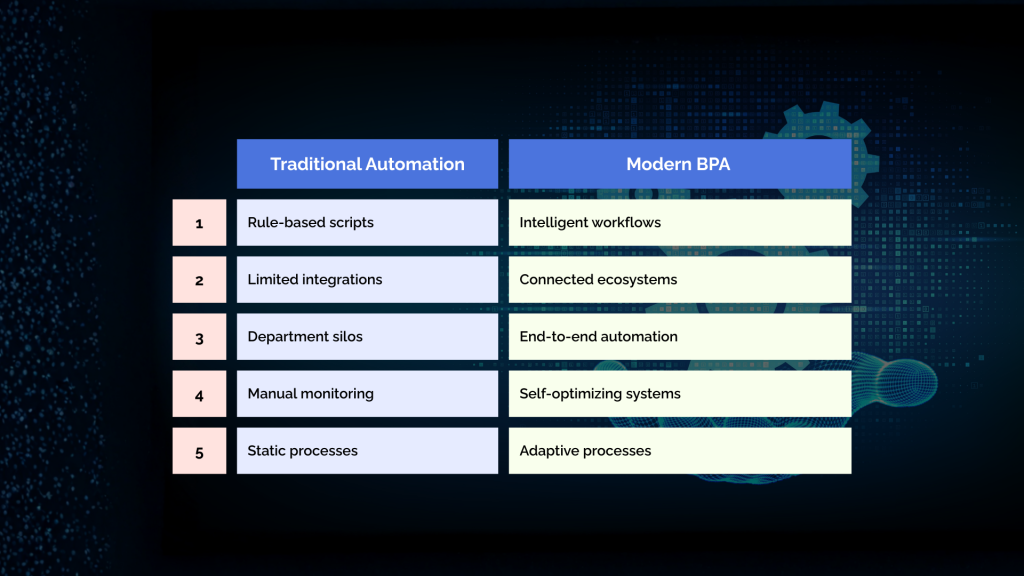
BPA goes far beyond basic scripts and task automation.
Modern automation combines:
- Workflow engines
- AI and machine learning
- Low-code and no-code platforms
- API integrations
- Cloud infrastructure
- Real-time analytics
Traditional Automation vs Modern BPA
Why Streamlining Business Processes Matters More Than Ever
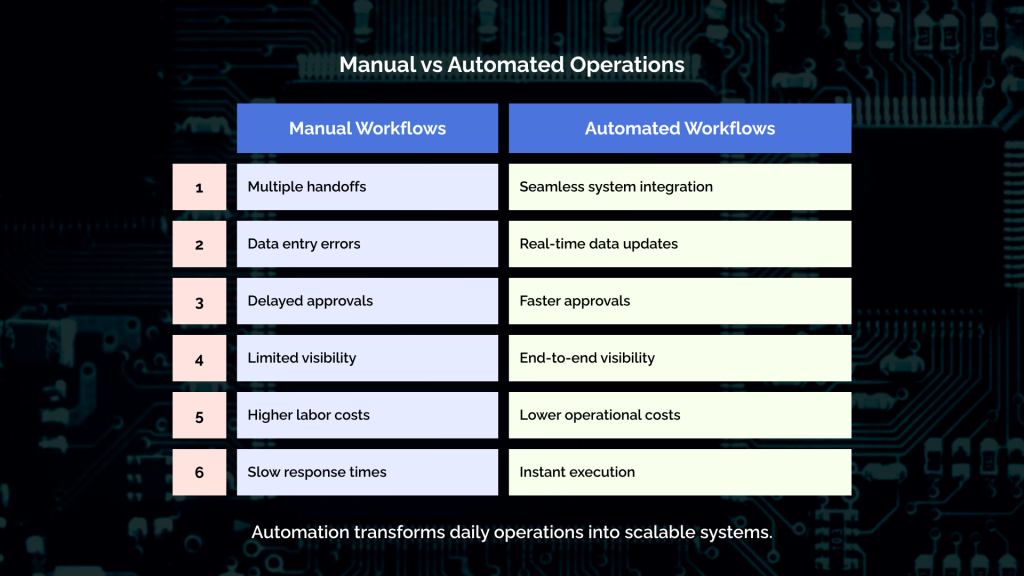
In 2026, inefficiency is expensive.
Every manual task creates:
- Delays
- Errors
- Frustration
- Higher labor costs
- Missed opportunities
The Hidden Cost of Manual Workflows
Many organizations underestimate how much inefficiency costs them.
Common examples include:
- Reentering data across systems
- Manual approvals
- Email-based handoffs
- Spreadsheet tracking
- Disconnected reporting
These activities consume thousands of hours every year.
Automation converts this wasted effort into productive capacity.
Key Business Benefits of Automation
When done correctly, automation delivers:
- Faster cycle times
- Higher accuracy
- Lower operational costs
- Better compliance
- Improved employee satisfaction
- Enhanced customer experience
Automation turns operations into a competitive asset.
How to Define Business Processes to Automate for Operational Efficiency
One of the biggest mistakes companies make is automating the wrong processes.
Not every task should be automated.
You must start with clarity.
Step 1: Map Your Current Processes
Begin with a detailed process audit.
Document:
- Inputs
- Outputs
- Systems used
- Decision points
- Manual touchpoints
- Exceptions
Use process maps or flowcharts to visualize workflows.
Step 2: Identify Automation Candidates
Strong candidates for automation share these traits:
- High volume
- Repetitive steps
- Rule-based logic
- Frequent errors
- Long cycle times
- Cross-department handoffs
Examples include:
- Invoice processing
- Order fulfillment
- Employee onboarding
- Customer support routing
- Inventory updates
- Lead management
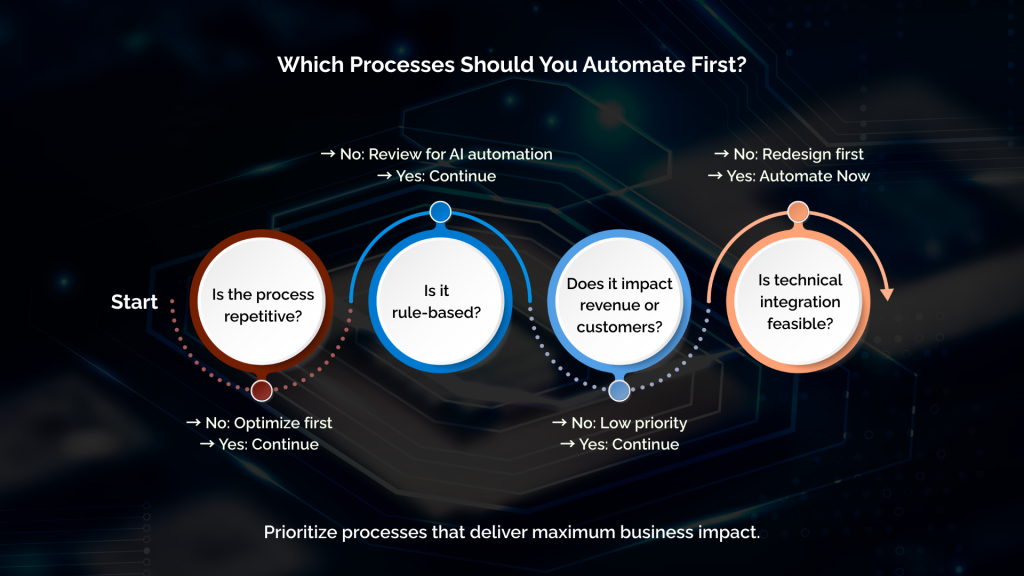
Step 3: Prioritize by Impact and Feasibility
Use a simple scoring model:
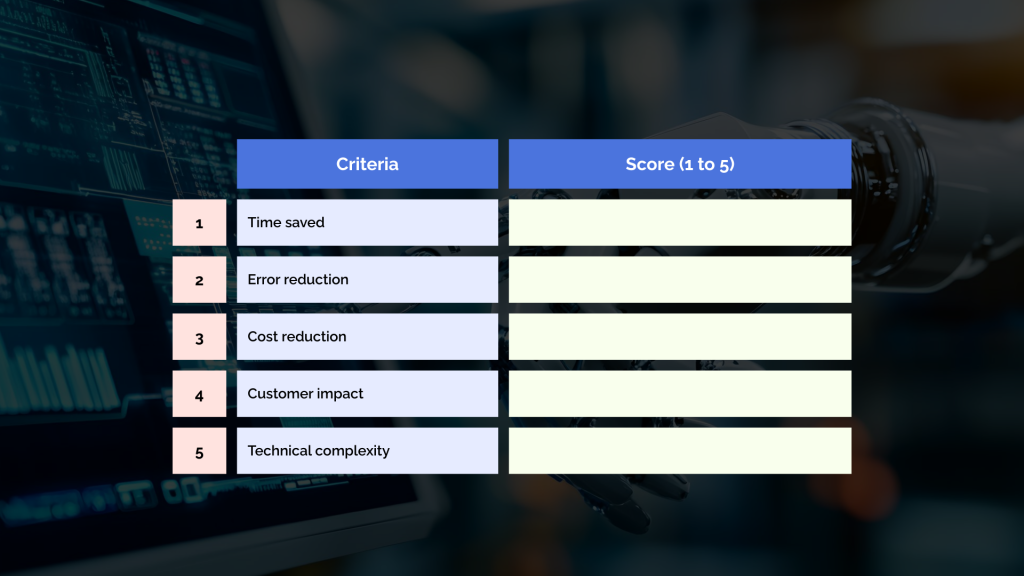
Start with high-impact, low-complexity workflows.
Step 4: Redesign Before Automating
Never automate a broken process.
Before implementation:
- Remove unnecessary steps
- Simplify approvals
- Standardize data formats
- Eliminate redundancies
Automation amplifies efficiency only when processes are optimized first.
For a deeper understanding of how connected systems eliminate manual handoffs and streamline work across teams add this case-based guide on how to connect your systems and remove bottlenecks.
Core Types of Business Process Automation
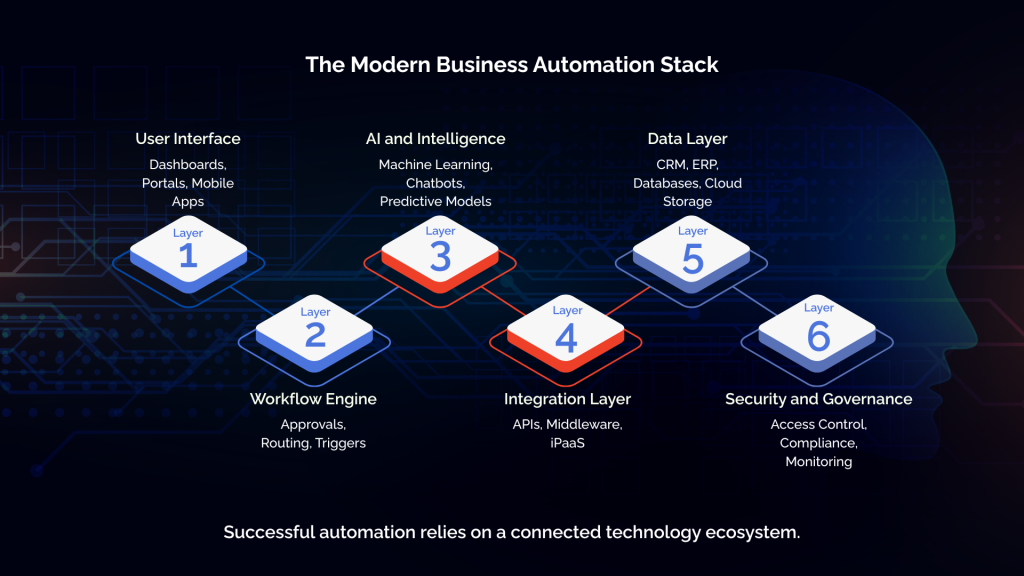
Modern BPA covers multiple automation layers.
Workflow Automation
Workflow automation manages task sequences, approvals, and routing.
Examples:
- Purchase requests
- Contract approvals
- Customer onboarding
- Incident resolution
Robotic Process Automation (RPA)
RPA mimics human interactions with software.
Best for:
- Legacy systems
- Screen scraping
- Form filling
- Data migration
Intelligent Automation
This combines AI with workflows.
Capabilities include:
- Document recognition
- Chatbots
- Predictive routing
- Anomaly detection
- Decision automation
Integration Automation
This connects systems through APIs.
Examples:
- CRM to ERP sync
- eCommerce to accounting
- Marketing automation to sales tools
Integration is the backbone of scalable automation.
Learn how machine learning powers intelligent automation and predictive workflows with real ecommerce examples in this breakdown of ML in modern digital operations.
Business Process Automation Software and Tools
The BPA software ecosystem has matured significantly.
Categories of Automation Tools
1. Low-Code and No-Code Platforms
Enable business users to build workflows without heavy development.
2. Enterprise BPM Suites
Designed for complex governance and compliance.
3. Integration Platforms
Connect cloud and on-premise systems.
4. AI Automation Platforms
Power cognitive automation and predictive workflows.
5. Industry-Specific Tools
Tailored for finance, healthcare, manufacturing, and retail.
Key Features to Look For
When evaluating business process automation software, prioritize:
- Scalability
- Security compliance
- Integration ecosystem
- Analytics and monitoring
- Version control
- Role-based access
- AI capabilities
- Vendor support
Avoid Tool Overload
More tools do not equal better automation.
Standardize platforms where possible.
Fragmentation kills automation maturity..
Workflow automation is advancing rapidly, with drag-and-drop interfaces, real-time collaboration capabilities, and scalable integrations helping teams of all sizes streamline operations more effectively.
Building an Automation-First Operating Model
Automation succeeds when it becomes part of your operating philosophy.
Governance and Ownership
Define clear roles:
- Automation sponsor
- Process owners
- Technical leads
- Compliance reviewers
- Change managers
Without ownership, automation fails.
Center of Excellence (CoE)
Leading organizations build automation centers that:
- Define standards
- Reuse components
- Ensure quality
- Train teams
- Measure ROI
This prevents shadow automation.
Cultural Adoption
Automation is not about replacing people.
It is about elevating them.
Communicate clearly:
- Why automation exists
- How it helps employees
- What new opportunities it creates
Change management is critical.
If you are planning automation for B2B operations, these essential strategies outline how digital transformation and commerce automation align for enterprise success.
Not sure where to start with automation?
Step-by-Step Guide to Implementing Workflow Automation
Phase 1: Strategy and Planning
- Define business objectives
- Select priority processes
- Secure executive sponsorship
- Set success metrics
Phase 2: Process Design
- Map future-state workflows
- Define business rules
- Identify integrations
- Validate with stakeholders
Phase 3: Platform Selection
- Compare vendors
- Run pilot projects
- Evaluate scalability
- Assess total cost
Phase 4: Development and Configuration
- Build workflows
- Configure integrations
- Set security policies
- Develop exception handling
Phase 5: Testing and Validation
Test for:
- Accuracy
- Performance
- Security
- Edge cases
- Compliance
Never skip testing.
Phase 6: Deployment and Training
- Roll out gradually
- Train users
- Provide documentation
- Set feedback loops
Phase 7: Optimization
Automation is never finished.
Continuously:
- Analyze performance
- Improve logic
- Add new use cases
- Retire outdated flows
Common Automation Mistakes and How to Avoid Them
Automating Without Strategy
Random automation leads to chaos.
Always align with business goals.
Ignoring Exceptions
Real workflows have exceptions.
Design for them.
Overengineering
Complexity kills adoption.
Start simple.
Underestimating Change Management
People resist poorly explained automation.
Invest in communication.
No Performance Tracking
If you do not measure results, automation becomes invisible.
Measuring ROI and Performance of Automation
Key Metrics to Track
- Cycle time reduction
- Cost per transaction
- Error rates
- Throughput
- Customer satisfaction
- Employee productivity
- System uptime
Financial Impact Analysis
Calculate:
- Labor savings
- Error prevention costs
- Revenue acceleration
- Compliance savings
- Infrastructure optimization
Automation ROI should be visible within 6 to 18 months.
Continuous Improvement Framework
Use quarterly reviews to:
- Retire low-value workflows
- Expand high-impact automations
- Refine governance
The Role of Automation Companies
Choosing the right automation partner matters.
What a Good Automation Company Provides
- Process consulting
- Technology expertise
- Integration skills
- Security compliance
- Industry knowledge
- Long-term support
Questions to Ask Vendors
- How do you handle scalability?
- What governance models do you follow?
- How do you ensure security?
- What is your post-deployment support?
- Can you provide case studies?
Avoid vendors who focus only on tools, not outcomes.
Future Trends in Business Workflow Automation
Looking ahead, automation will evolve through:
Autonomous Workflows
AI agents managing processes independently.
Hyperautomation
Combining BPA, RPA, AI, analytics, and integrations.
Composable Automation
Modular workflows built like software components.
Embedded Automation
Automation built directly into core platforms.
Governance-Driven AI
Stronger compliance frameworks for automated decisions.
2026 marks the transition from automation projects to automation ecosystems.
According to a 2025 industry trends report, automation is evolving toward AI-driven workflows that reduce error and accelerate outcomes across departments. These trends highlight how enterprises are leveraging predictive analytics and intelligent task orchestration to unlock efficiency gains.
Frequently Asked Questions (FAQs)
What is business process automation in simple terms?
Business process automation uses software to handle repetitive tasks and workflows automatically, reducing manual work and improving efficiency.
Which business processes should be automated first?
Start with high-volume, repetitive, rule-based processes that consume time and generate frequent errors.
Is automation suitable for small businesses?
Yes. Modern low-code and cloud platforms make automation affordable and scalable for small and medium businesses.
How long does automation implementation take?
Simple workflows may take weeks. Enterprise-level programs usually take several months with phased rollouts.
Can automation replace human jobs?
Automation replaces repetitive tasks, not people. It allows employees to focus on strategic and creative work.
Conclusion: Turning Automation Into a Strategic Advantage
Business process automation is no longer optional for competitive organizations.
It is the foundation of:
- Operational resilience
- Scalable growth
- Cost control
- Customer satisfaction
- Innovation capacity
Companies that treat automation as a long-term capability will outperform those who see it as a short-term project.
The goal is not just faster workflows.
The goal is smarter business.